 -by
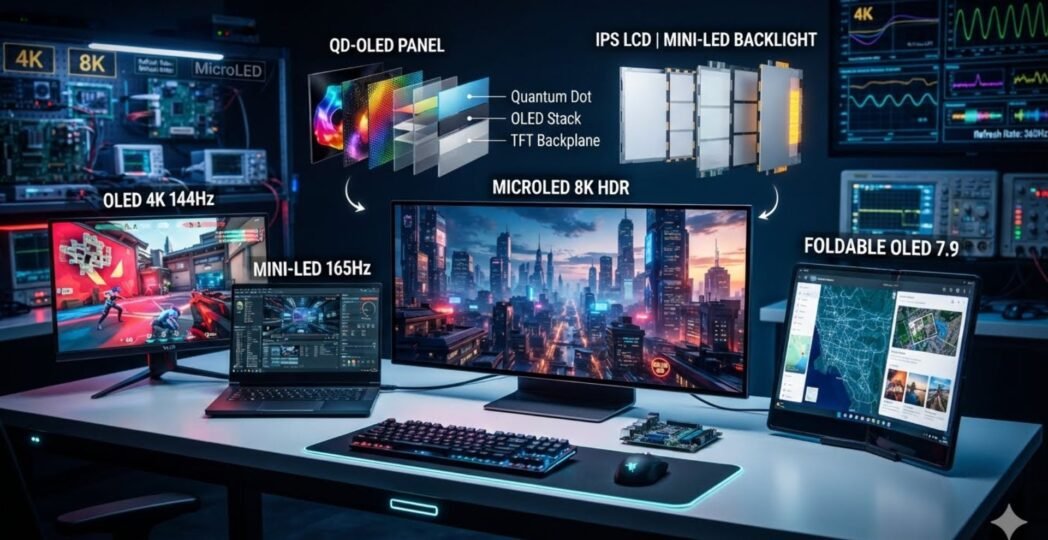
-by Modern screens have transformed how people work, learn, play, and communicate. Whether you use a smartphone, laptop, gaming monitor, television, smartwatch, or vehicle infotainment system, the quality of the display directly affects your experience. In 2026, manufacturers continue pushing the boundaries with brighter panels, higher refresh rates, lower power consumption, and more realistic colors.
Today’s Display Technology is no longer limited to traditional LCD panels. Innovations such as OLED, Mini-LED, MicroLED, Quantum Dot displays, and advanced IPS panels are making screens more immersive than ever. Artificial intelligence is also helping optimize brightness, color accuracy, and battery efficiency in real time.
This guide explains everything you need to know about Display Technology in 2026. You’ll discover how each technology works, where it performs best, its advantages and disadvantages, and which option delivers the best value for different users. Whether you’re buying a flagship smartphone, upgrading your gaming setup, or selecting a professional monitor, this guide will help you make an informed decision.
If your readers are interested in technology, digital tools, or online business, they can explore Tech All World and Techh AtoZ for tutorials, software guides, and technology news.
What Is Display Technology?
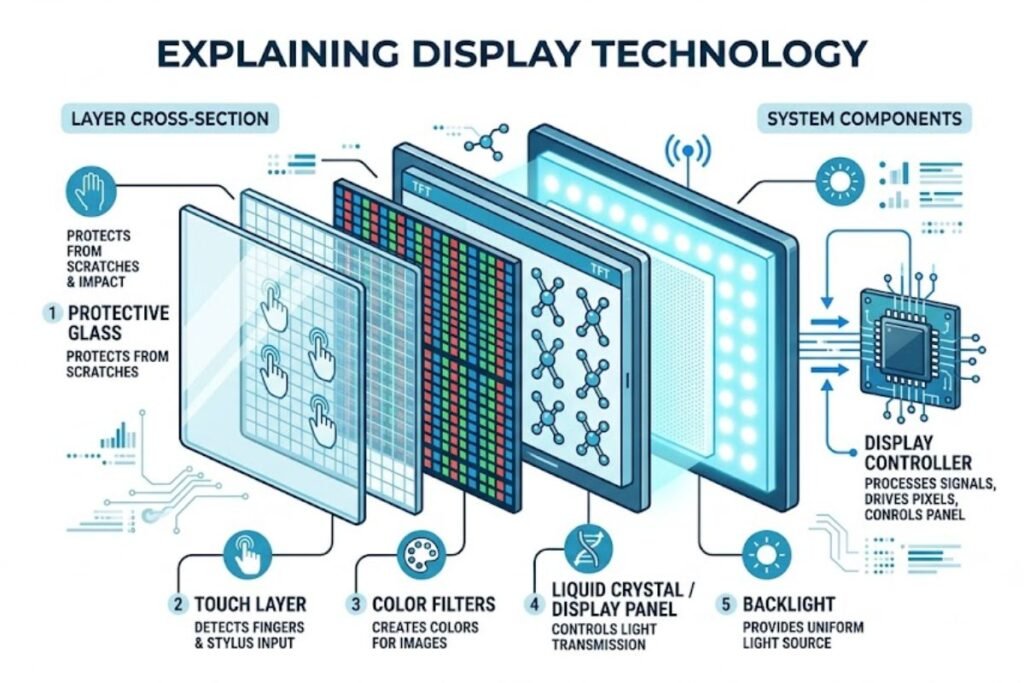
Display Technology refers to the methods and hardware used to produce images, videos, and graphical content on electronic screens. Every modern digital device relies on display systems that convert electrical signals into visible images.
A display consists of multiple components working together:
- Display panel
- Backlighting or self-emitting pixels
- Color filters
- Display controller
- Touch layer (for touch-enabled devices)
- Protective glass
Modern display technologies focus on improving:
- Brightness
- Contrast ratio
- Color accuracy
- Energy efficiency
- Viewing angles
- Response time
- Refresh rate
- Screen lifespan
As manufacturers continue to innovate, consumers benefit from sharper visuals, smoother motion, and lower power consumption across all types of devices.
Why Display Technology Matters in 2026
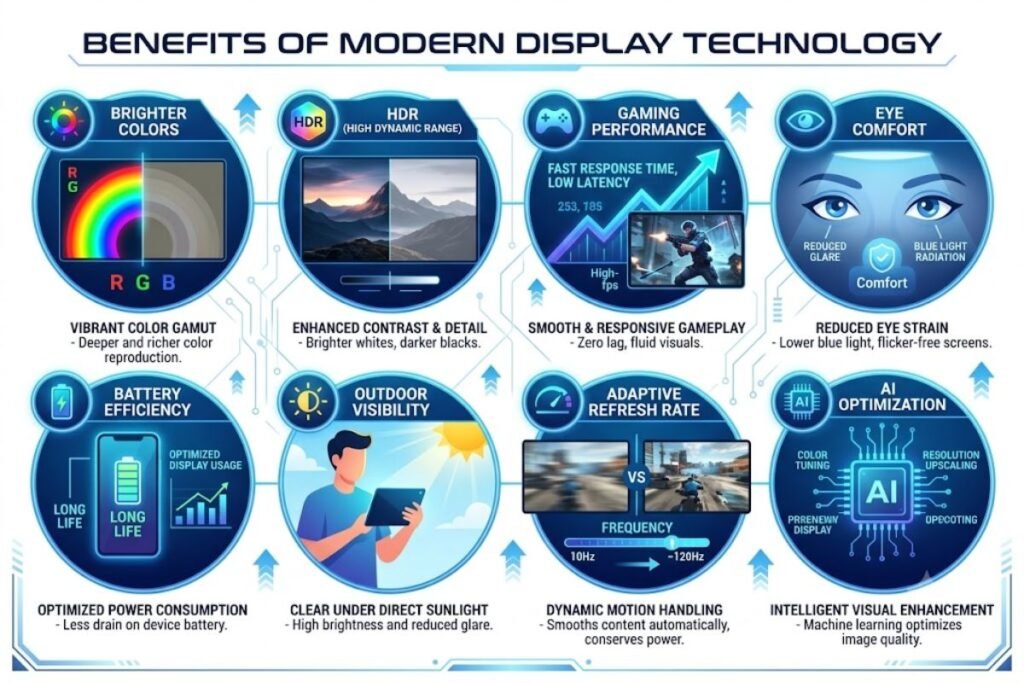
Displays have become one of the most important components in modern electronics. Powerful processors and cameras are valuable, but users interact with the screen every second they use a device. The latest Display Technology improves nearly every aspect of the user experience.
Better Visual Quality
Modern panels deliver:
- Richer colors
- Deeper blacks
- Higher brightness
- More realistic HDR content
- Better outdoor visibility
Improved Gaming Experience
Gaming displays now feature:
- 240Hz and 360Hz refresh rates
- Ultra-fast response times
- Variable Refresh Rate (VRR)
- Adaptive Sync technologies
These features reduce motion blur and improve responsiveness.
Greater Power Efficiency
Advanced display panels intelligently adjust refresh rates and brightness to save battery life without sacrificing image quality.
Enhanced Eye Comfort
Manufacturers now include:
- Low blue light modes
- PWM dimming improvements
- Anti-reflective coatings
- Automatic brightness adjustment
These features reduce eye strain during extended use.
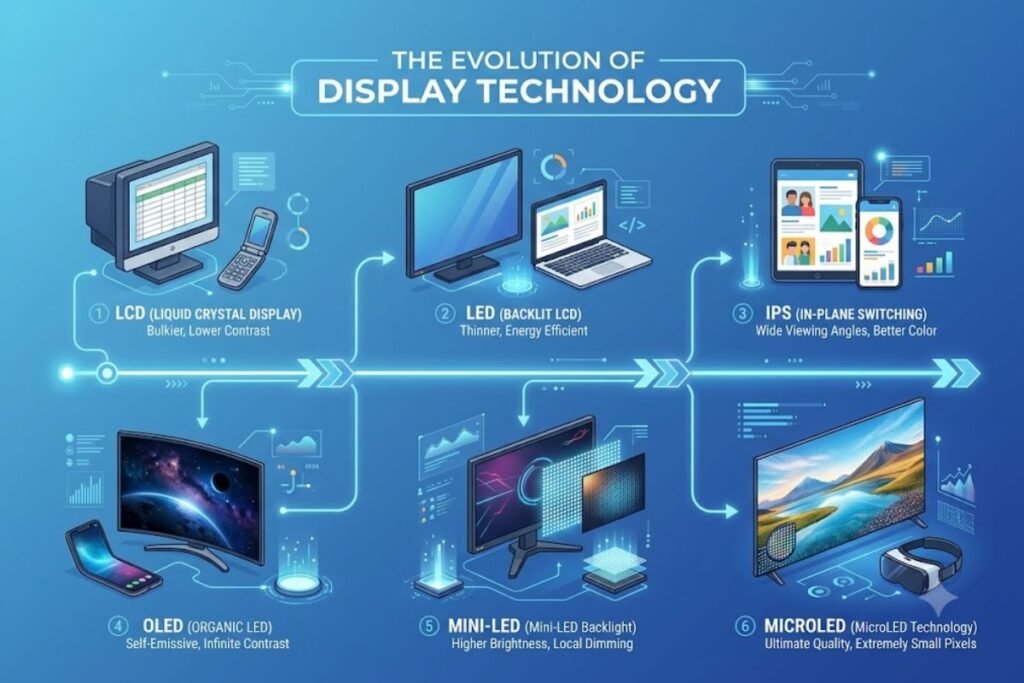
Evolution of Display Technology
The journey of Display Technology has been remarkable.
| Generation | Main Technology | Key Features |
| CRT | Cathode Ray Tube | Large, heavy, basic color display |
| LCD | Liquid Crystal Display | Thin, lightweight, affordable |
| LED | LED Backlit LCD | Better brightness and efficiency |
| IPS | In-Plane Switching | Wide viewing angles |
| OLED | Organic LEDs | Perfect blacks and vibrant colors |
| Mini-LED | Thousands of LEDs | Better HDR and local dimming |
| MicroLED | Self-emitting LEDs | Premium image quality and long lifespan |
Every generation has improved picture quality, efficiency, and durability.
Main Types of Display Technology
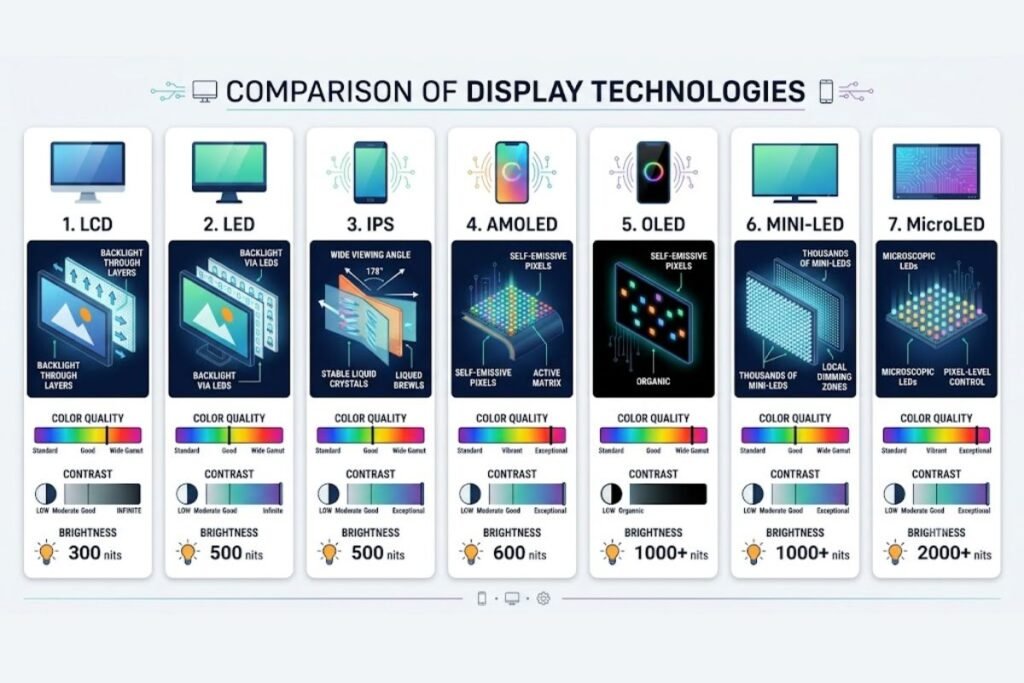
Several display types dominate today’s electronics market.
LCD Display Technology
LCD technology remains one of the most widely used screen technologies because it offers excellent value. LCD panels rely on liquid crystals that control light passing through a backlight.
Advantages include:
- Affordable pricing
- Good brightness
- Long lifespan
- Wide availability
- Suitable for offices and education
Limitations include:
- Lower contrast than OLED
- Backlight bleeding
- Less accurate black levels
Despite newer alternatives, LCD remains popular for budget laptops, monitors, and televisions.
LED Display Technology
Many consumers believe LED displays are completely different from LCD screens.
In reality, LED display technology uses LCD panels illuminated by LED backlights.
Benefits include:
- Higher brightness
- Better energy efficiency
- Slimmer designs
- Lower heat generation
LED displays dominate the television and monitor market because they balance performance and affordability.
IPS Display Technology
IPS display technology is a premium form of LCD. It offers significant improvements over traditional TN panels.
Advantages include:
- Wide viewing angles
- Excellent color accuracy
- Better image consistency
- Professional-grade visuals
IPS displays are popular among:
- Graphic designers
- Photographers
- Video editors
- Content creators
- Office professionals
AMOLED Display Technology
One of the most recognized innovations is AMOLED display technology. Unlike LCDs, AMOLED panels use self-emitting pixels. Each pixel produces its own light, eliminating the need for a backlight.
Benefits include:
- Infinite contrast
- Perfect blacks
- Thin construction
- Faster response times
- Excellent HDR support
AMOLED displays dominate premium smartphones because they deliver exceptional image quality while reducing power consumption during dark mode usage.
OLED Display Technology
OLED represents one of the biggest breakthroughs in Display Technology.
OLED screens feature:
- Self-lighting pixels
- Near-instant response times
- Outstanding HDR performance
- Flexible display designs
- Ultra-thin panels
OLED displays now power:
- Premium TVs
- Foldable phones
- Gaming handhelds
- Professional monitors
- Smartwatches
However, OLED technology still faces challenges such as higher manufacturing costs and the potential for image retention after displaying static content for extended periods.
Understanding Refresh Rate
Refresh rate determines how many times a display updates each second.
Common refresh rates include:
| Refresh Rate | Best For |
| 60Hz | Everyday use |
| 90Hz | Entry-level smartphones |
| 120Hz | Flagship devices |
| 144Hz | Gaming |
| 165Hz | Competitive gaming |
| 240Hz | Esports |
| 360Hz | Professional esports |
Higher refresh rates produce smoother scrolling, gaming, and animations.
Resolution Standards in 2026
Resolution continues improving across nearly every category.
HD (1280×720)
Suitable for budget devices.
Full HD (1920×1080)
Still common for monitors and laptops.
Quad HD (2560×1440)
Popular among gamers and creators.
4K Ultra HD
The preferred resolution for premium televisions and high-end monitors.
8K Resolution
Still considered premium but gradually becoming more accessible for professional applications.
Important Display Specifications
When comparing displays, consider these specifications instead of focusing only on resolution.
Brightness
Higher brightness improves outdoor visibility and HDR performance.
Contrast Ratio
Higher contrast produces deeper blacks and brighter highlights.
Color Accuracy
Professional users often look for:
- 100% sRGB
- DCI-P3 coverage
- Adobe RGB support
Response Time
Lower response times reduce motion blur.
HDR Support
High Dynamic Range improves:
- Bright highlights
- Shadow detail
- Color depth
- Overall realism
Premium HDR certifications provide significantly better viewing experiences.
Display Technology in Smartphones
Smartphone manufacturers continue to innovate rapidly. Premium devices increasingly feature adaptive refresh rates, LTPO panels, AI-enhanced brightness control, and ultra-thin bezels. New flagship models are expected to push the limits of Galaxy S26 Ultra display technology, offering brighter AMOLED panels, improved durability, and enhanced power efficiency.
Industry discussions also continue around Apple’s 20th anniversary iPhone display technology, with expectations of major display innovations such as under-display sensors, advanced OLED evolution, or next-generation self-emissive panels. These advancements demonstrate how Display Technology continues to evolve, making smartphone screens brighter, smarter, and more immersive than ever before.
Mini-LED Display Technology
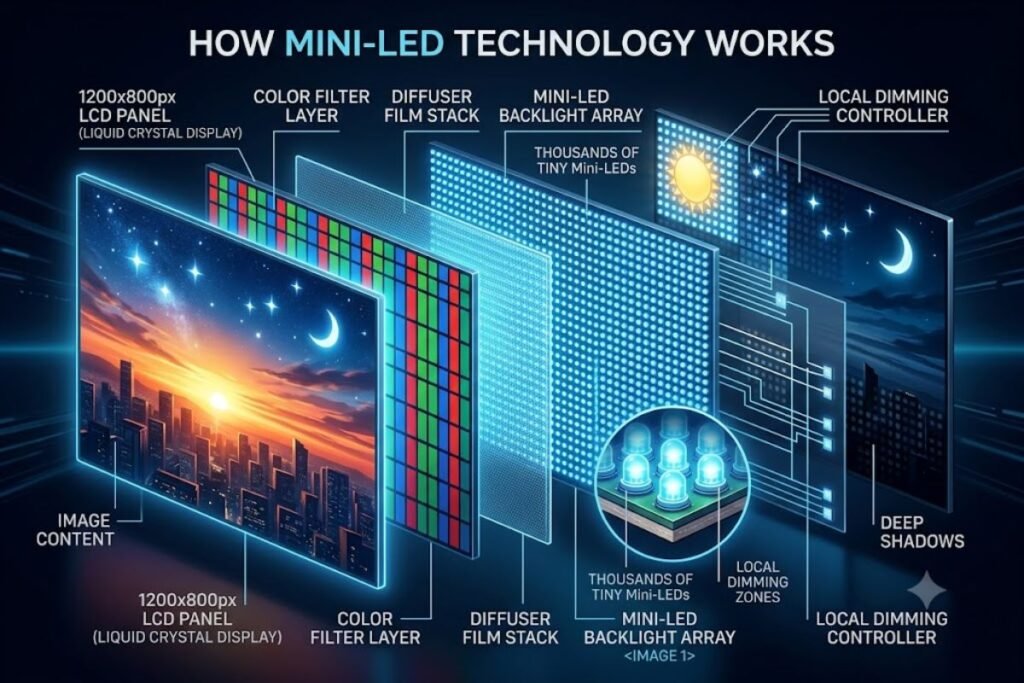
Mini-LED is one of the biggest advancements in modern Display Technology. Instead of using a few hundred LEDs for backlighting, Mini-LED panels use thousands of tiny LEDs. This allows much finer control over brightness across different parts of the screen.
Unlike OLED, Mini-LED still relies on an LCD layer. However, its advanced local dimming system dramatically improves contrast and HDR performance.
How Mini-LED Works
Mini-LED technology divides the backlight into hundreds or even thousands of local dimming zones. Each zone adjusts its brightness independently, creating brighter highlights and deeper shadows. This technology significantly reduces light bleeding compared to traditional LED-backlit LCD panels.
Advantages of Mini-LED
- Extremely high brightness
- Excellent HDR performance
- Improved black levels
- Long lifespan
- Lower burn-in risk than OLED
- Suitable for bright environments
Disadvantages
- More expensive than standard LCD
- Slight halo effect around bright objects
- Not capable of perfect blacks like OLED
Mini-LED displays are now common in premium TVs, gaming monitors, tablets, and professional laptops.
MicroLED Display Technology
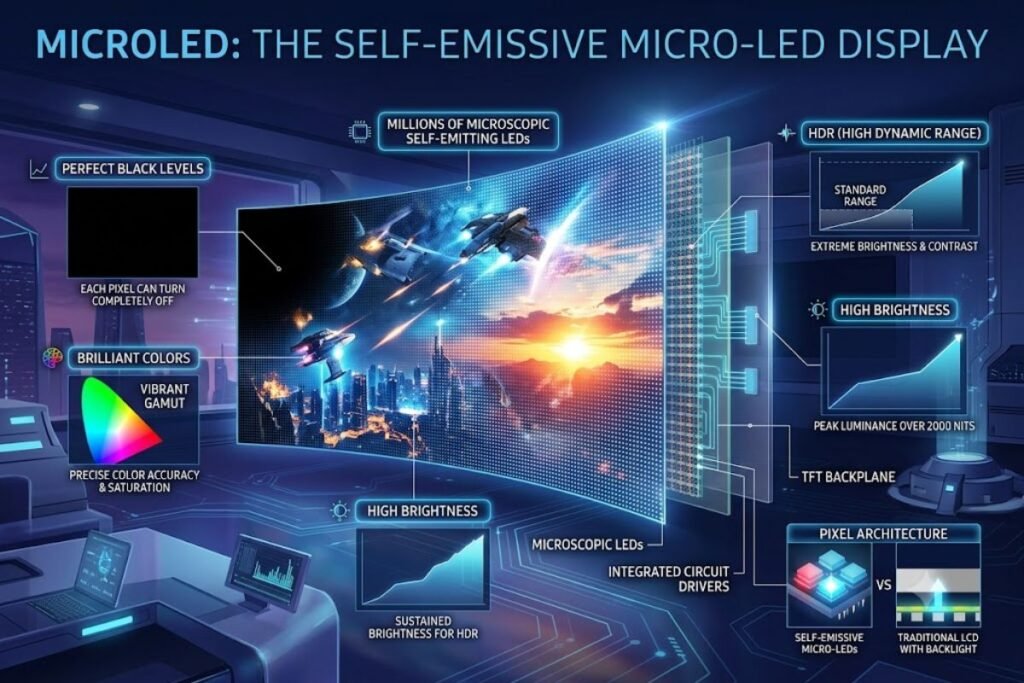
One of the most exciting innovations in Display Technology is microLED display technology, also referred to as microled display technology or micro-led display technology.
Industry experts believe MicroLED represents the future of premium displays because it combines the strengths of OLED and LCD while minimizing their weaknesses.
What Is MicroLED?
MicroLED uses millions of microscopic LEDs. Every individual pixel generates its own light, eliminating the need for a backlight. Each tiny LED functions independently, producing exceptional brightness and color accuracy.
Benefits of MicroLED
- Perfect black levels
- Outstanding brightness
- Longer lifespan than OLED
- Exceptional energy efficiency
- No burn-in concerns
- Ultra-fast response time
- Superior HDR performance
- Better durability
Challenges
Despite its impressive performance, MicroLED faces several obstacles.
- Extremely high production costs
- Complex manufacturing
- Limited consumer availability
- Premium pricing
As manufacturing improves, analysts expect MicroLED to become increasingly affordable over the coming years.
Quantum Dot Display Technology (QLED)
Quantum Dot technology enhances LED displays by using microscopic semiconductor particles that emit highly accurate colors when exposed to light. Many premium televisions now combine Quantum Dot layers with Mini-LED backlighting to achieve exceptional picture quality.
Benefits
- Brilliant color accuracy
- Excellent brightness
- Improved HDR
- Wide color gamut
- Better efficiency
QLED displays remain popular for users who prefer bright living-room televisions.
Comparing OLED, Mini-LED, and MicroLED
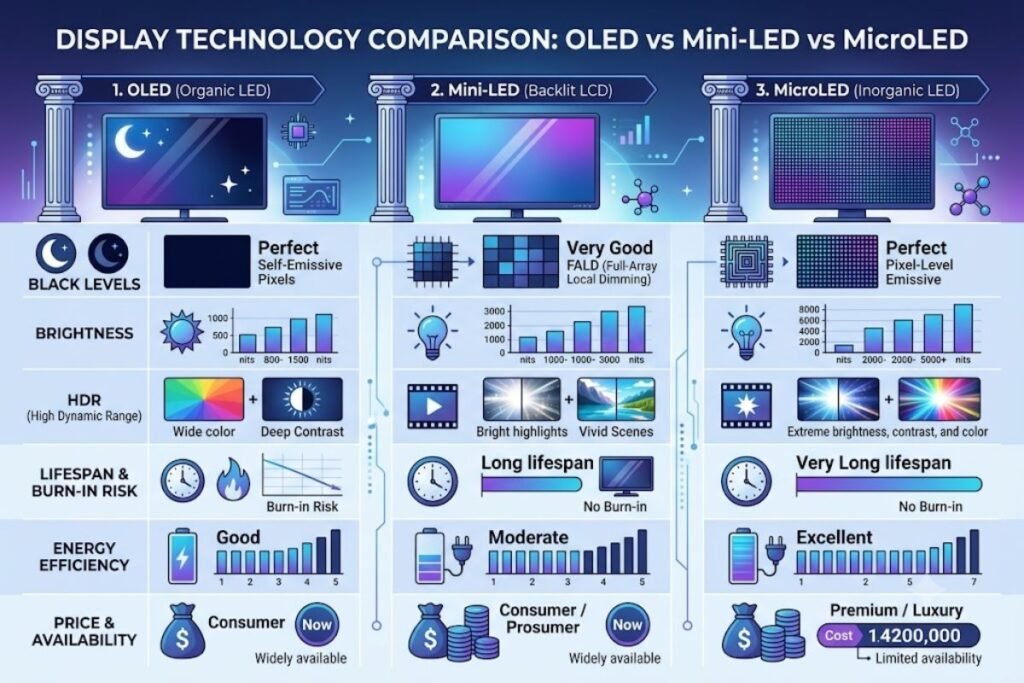
| Feature | OLED | Mini-LED | MicroLED |
| Black Levels | Excellent | Very Good | Perfect |
| Brightness | Excellent | Outstanding | Outstanding |
| HDR | Excellent | Excellent | Best |
| Burn-in Risk | Possible | None | None |
| Lifespan | High | Very High | Extremely High |
| Cost | Premium | Premium | Very Expensive |
| Energy Efficiency | Excellent | Very Good | Outstanding |
Each technology serves different user needs, budgets, and environments.
Touch Display Technology
Modern touch display technology has become an essential feature in smartphones, tablets, laptops, kiosks, and smart home devices. Touchscreens combine display panels with touch sensors that detect user input.
Types of Touch Displays
Capacitive Touch
Most smartphones use capacitive touch technology because it offers:
- High accuracy
- Multi-touch support
- Fast response
- Excellent durability
Resistive Touch
Still used in industrial equipment because it works with gloves and styluses.
Infrared Touch
Common in interactive whiteboards and large presentation displays.
Interactive Display Technology
Interactive display technology is becoming more and more necessary in commercial, healthcare, retail, and educational settings.
Interactive displays enable users to:
- Draw
- Write
- Annotate
- Collaborate
- Present information
- Control software directly
Modern interactive displays include AI-powered handwriting recognition and cloud collaboration features. Businesses increasingly replace traditional whiteboards with interactive digital displays.
Automotive Display Technology
Vehicle manufacturers are investing heavily in automotive display technology. Modern vehicles now feature multiple displays instead of traditional analog gauges.
Today’s automotive displays include:
- Digital instrument clusters
- Central infotainment systems
- Passenger entertainment displays
- Head-up displays (HUD)
- Rear-seat entertainment
- Smart mirrors
Future vehicles will use OLED and MicroLED panels for better visibility, lower power consumption, and improved durability.
TV Display Technology
Choosing the right TV display technology depends on your budget and viewing habits.
LCD TVs
Affordable and reliable.
Best for:
- Budget buyers
- Bright rooms
- Everyday entertainment
QLED TVs
Excellent brightness and color.
Ideal for:
- Family rooms
- Sports
- HDR movies
OLED TVs
Outstanding image quality.
Best for:
- Movie lovers
- Home theaters
- Gaming
Mini-LED TVs
Provide impressive brightness and HDR performance while avoiding OLED burn-in concerns.
MicroLED TVs
Represent the future of premium home entertainment.
Industrial Display Solutions
Industrial environments require displays designed for reliability rather than entertainment. One example often discussed is cdtech tft lcd displays industrial display technology, which focuses on rugged LCD solutions for manufacturing, transportation, healthcare, and automation.
Industrial displays commonly offer:
- High durability
- Wide operating temperatures
- Sunlight readability
- Long operational life
- Touchscreen compatibility
- Waterproof construction
These specialized displays help factories and industrial systems operate efficiently under demanding conditions.
TPV Display Technology
Many professionals encounter the terms TPV display technology and TPV Display Technology Xiamen Co., Ltd. when researching global display manufacturers and suppliers.
Companies in this sector develop LCD modules, display panels, and integrated display solutions for consumer electronics, industrial systems, automotive applications, and commercial devices. Their products support industries requiring dependable, scalable display components.
3D Display Technologies
Interest in 3d display technologies has returned thanks to improvements in processing power and display hardware. Modern systems focus on delivering immersive visuals without requiring special glasses.
Applications include:
- Medical imaging
- Scientific visualization
- Engineering
- Education
- Entertainment
- Product design
These advancements improve user engagement and visual understanding across many industries.
Naked Eye 3D LED Display Technology
A major innovation within the 3D field is naked eye 3d led display technology. Unlike traditional 3D systems, this technology allows viewers to experience depth without wearing glasses.
Advantages include:
- More natural viewing
- Better advertising displays
- Interactive exhibitions
- Museum installations
- Retail signage
- Digital billboards
As production costs decrease, glasses-free 3D displays are expected to become more common in commercial environments.
Scalable Display Technologies
Businesses increasingly require scalable display technologies that can expand from small installations to massive display walls.
Examples include:
- Video walls
- Control room displays
- Stadium scoreboards
- Airport information systems
- Smart city displays
- Conference centers
Scalable systems allow organizations to increase display size without sacrificing image quality.
Emerging Display Technology News
Recent display technology news highlights several industry trends shaping the future:
- AI-powered image optimization
- Rollable OLED displays
- Transparent OLED panels
- Brighter MicroLED prototypes
- More efficient Mini-LED manufacturing
- Foldable and tri-fold smartphones
- Improved LTPO technology
- Ultra-low-power wearable displays
- Advanced AR and VR micro-displays
These innovations indicate that display performance will continue to improve across smartphones, televisions, vehicles, and professional devices.
Display Technology Buying Guide
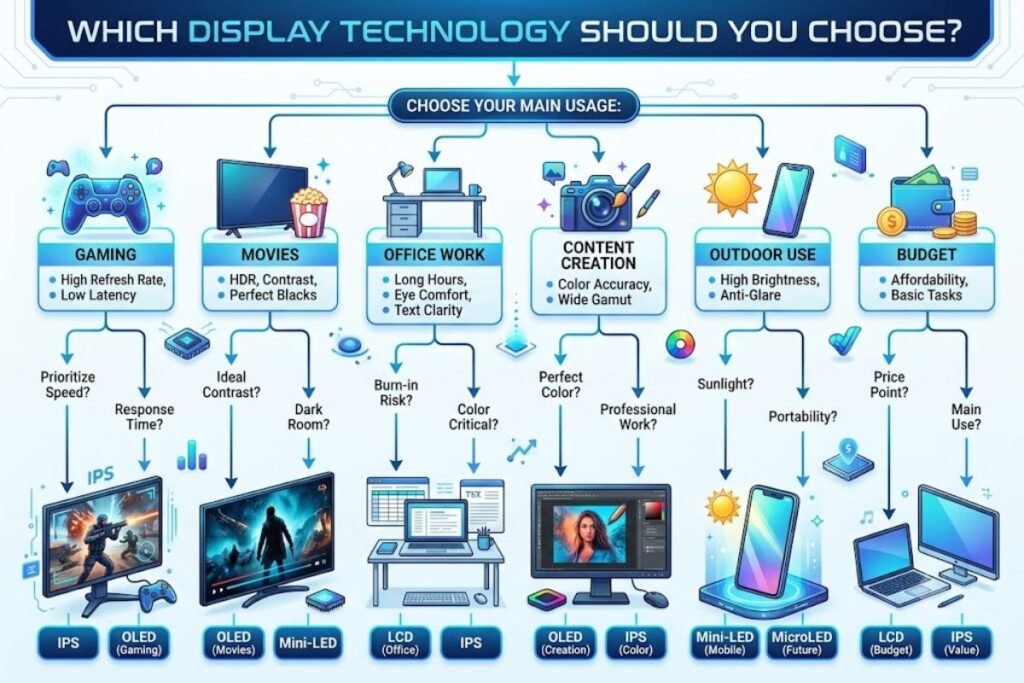
Choosing the right Display Technology depends on your priorities.
Choose LCD If You:
- Need an affordable display
- Work mainly with office applications
- Want reliable everyday performance
Choose IPS If You:
- Edit photos or videos
- Need accurate colors
- Share your screen frequently
Choose AMOLED or OLED If You:
- Watch movies regularly
- Want perfect blacks
- Prefer premium smartphones
- Enjoy HDR content
Choose Mini-LED If You:
- Need high brightness
- Play HDR games
- Work in bright environments
- Want excellent longevity
Choose MicroLED If You:
- Want the newest premium technology
- Have a flexible budget
- Need exceptional image quality
- Prefer long-term durability
Industries Benefiting from Advanced Display Technology
The rapid evolution of Display Technology supports many industries beyond consumer electronics.
These include:
- Healthcare
- Education
- Aviation
- Automotive
- Manufacturing
- Smart homes
- Retail
- Digital advertising
- Broadcasting
- Gaming
- Entertainment
- Scientific research
- Defense
- Hospitality
Even travel and lifestyle websites can benefit from high-quality visuals. For example, destination guides on Beach Near become more engaging with vibrant display technology, while restaurant photography on Restaurent.net looks more appealing on high-resolution screens.
The Future of Display Technology
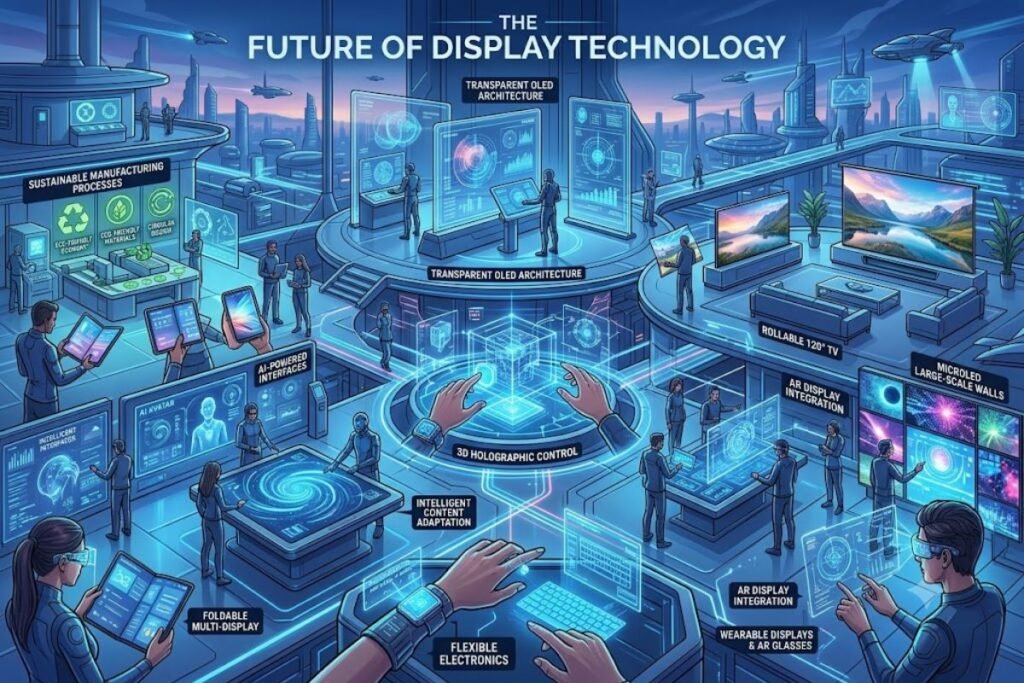
The future of Display Technology looks more exciting than ever. Researchers and manufacturers continue developing smarter, thinner, brighter, and more energy-efficient displays that deliver incredible visual experiences across every type of device.
Artificial intelligence (AI), advanced materials, and flexible electronics are driving the next wave of innovation. Over the next several years, consumers can expect displays that are not only visually impressive but also adaptive, sustainable, and highly personalized.
AI-Powered Displays
Artificial intelligence is becoming a core part of modern display systems. Instead of relying solely on hardware improvements, AI optimizes the viewing experience in real time.
AI-powered displays can:
- Automatically adjust brightness based on ambient light.
- Enhance image sharpness and clarity.
- Improve HDR content.
- Reduce power consumption.
- Optimize refresh rates for different applications.
- Minimize eye strain during extended use.
These intelligent features create a better experience while extending battery life on smartphones, laptops, and tablets.
Foldable and Rollable Displays
Flexible OLED technology continues to mature in 2026.
Manufacturers are introducing:
- Foldable smartphones
- Rollable televisions
- Expandable tablets
- Flexible automotive dashboards
- Wearable smart displays
These innovative products provide larger viewing areas without increasing device size, making them ideal for productivity and entertainment.
Transparent Displays
Transparent OLED and MicroLED displays are moving from concept products to commercial applications.
Potential uses include:
- Smart retail windows
- Museum exhibits
- Automotive head-up displays
- Smart home devices
- Airport information systems
- Luxury storefronts
Transparent displays allow users to see digital information while maintaining visibility through the screen.
Eco-Friendly Display Manufacturing
Sustainability has become a major focus for display manufacturers.
Companies are investing in:
- Energy-efficient production
- Recyclable materials
- Reduced carbon emissions
- Longer-lasting panels
- Lower power consumption
- Eco-friendly packaging
These improvements help reduce electronic waste while lowering environmental impact.
Common Display Technology Myths
Many misconceptions still exist about Display Technology. Understanding the facts helps consumers make smarter buying decisions.
Myth 1: OLED Always Burns In
Modern OLED displays include advanced protection features that significantly reduce the risk of permanent burn-in during normal use.
Myth 2: More Resolution Always Means Better Quality
Resolution is important, but brightness, contrast, color accuracy, HDR performance, and refresh rate often have a greater impact on the overall viewing experience.
Myth 3: LED and LCD Are Completely Different
Most LED televisions are actually LCD panels illuminated by LED backlighting.
Myth 4: Higher Refresh Rates Only Benefit Gamers
Smooth scrolling, responsive touch interactions, and improved animations benefit everyone—not just gamers.
Myth 5: Expensive Displays Are Always Better
The best display depends on your needs. Many mid-range IPS, OLED, and Mini-LED displays offer excellent value for everyday users.
Expert Tips for Choosing the Best Display Technology
Before purchasing a new display, consider these recommendations:
- Determine your primary use (gaming, work, movies, or content creation).
- Compare HDR certifications.
- Check color gamut coverage.
- Consider screen brightness for your environment.
- Look for adaptive refresh rate support.
- Evaluate long-term durability.
- Balance performance with your budget.
- Read trusted reviews before making a final decision.
A thoughtful comparison ensures you invest in a display that meets your needs both now and in the future.
Why Display Technology Will Continue to Evolve
The demand for better digital experiences is growing worldwide. Consumers expect:
- More realistic visuals
- Longer battery life
- Improved accessibility
- Faster refresh rates
- Better durability
- Enhanced outdoor visibility
- Immersive gaming experiences
These expectations encourage manufacturers to innovate continuously, making Display Technology one of the fastest-evolving sectors in consumer electronics.
Conclusion
The world of Display Technology has advanced rapidly, offering consumers more choices than ever before. From affordable LCD panels to premium OLED, Mini-LED, and MicroLED displays, each technology serves different needs and budgets.
If you’re looking for value, IPS and LCDs remain excellent choices. For outstanding contrast and vibrant colors, AMOLED and OLED continue to dominate premium smartphones and televisions. Mini-LED provides exceptional brightness and HDR performance, while MicroLED represents the next frontier with its remarkable picture quality, efficiency, and durability.
As AI, flexible displays, transparent panels, and sustainable manufacturing become more common, the future of display innovation looks incredibly promising. Whether you’re purchasing a smartphone, monitor, laptop, television, or automotive display, understanding the strengths of each technology helps you make a confident buying decision.
For more technology guides, reviews, and buying advice, explore Tech All World and Techh AtoZ. If you’re planning your next vacation or searching for great dining experiences, visit Beach Near and Restaurent for travel inspiration, beach guides, and restaurant recommendations.
FAQs
Q: What is the best Display Technology in 2026?
Ans: The best Display Technology depends on your needs. OLED offers outstanding contrast and color, Mini-LED provides exceptional brightness and HDR, while MicroLED delivers premium image quality with excellent longevity and energy efficiency.
Q: Which Display Technology is best for gaming?
Ans: Gamers generally benefit from OLED, Mini-LED, or high-refresh-rate IPS displays. These technologies provide fast response times, smooth motion, low input lag, and excellent HDR performance.
Q: Is MicroLED better than OLED?
Ans: MicroLED offers higher brightness, longer lifespan, and no burn-in risk, making it a strong long-term solution. However, OLED remains more affordable and widely available, delivering exceptional picture quality for most users.
Q: Which display is better for professional content creators?
Ans: Professionals who edit photos or videos often prefer IPS or OLED displays with excellent color accuracy, wide color gamut coverage, and factory calibration for consistent visual performance.
Q: Does higher refresh rate improve everyday use?
Ans: Yes. A 120Hz or higher refresh rate creates smoother scrolling, more responsive touch interactions, and a noticeably better user experience, even for everyday tasks like browsing or reading.
Q: What is the future of Display Technology?
Ans: Future advancements include AI-powered image optimization, transparent displays, foldable and rollable screens, MicroLED expansion, sustainable manufacturing, and even more immersive visual experiences across consumer and professional devices.


14 Comments