 -by
-by Smart home technology continues to evolve, and Zigbee has become one of the most trusted wireless communication standards for connected devices. From smart lights and sensors to security systems and smart plugs, Zigbee smart home devices help homeowners create reliable, energy-efficient, and highly automated living spaces.
Unlike traditional Wi-Fi smart devices, Zigbee products use a low-power mesh network that improves coverage, reduces energy consumption, and enhances communication between devices. As smart homes become more popular worldwide, Zigbee remains a preferred choice for homeowners, businesses, and technology enthusiasts.
In this guide, you’ll learn what Zigbee is, how it works, its advantages, the best Zigbee smart home devices, and why it continues to play a major role in modern home automation.
What Is Zigbee?
Zigbee is a wireless communication protocol designed specifically for smart home and Internet of Things (IoT) devices. It allows compatible devices to communicate with each other using minimal power while maintaining reliable connectivity.
Unlike Wi-Fi, which focuses on high-speed internet access, Zigbee prioritizes efficient device-to-device communication.
Common Zigbee devices include:
- Smart bulbs
- Smart switches
- Motion sensors
- Door and window sensors
- Smart plugs
- Smart thermostats
- Security systems
- Smart locks
Many homeowners choose Zigbee because it offers dependable performance for home automation networks.
How to Choose the Right Zigbee Smart Home Devices

Buying the right Zigbee smart home devices involves more than choosing the cheapest option. Compatibility, reliability, and future expandability all play an important role in building a successful smart home ecosystem.
Before purchasing any Zigbee device, consider these important factors:
Hub Compatibility
Not every Zigbee device works with every hub. Always check whether the device is compatible with your preferred smart home platform, such as Home Assistant, SmartThings, Aqara Hub, or Amazon Echo with a built-in Zigbee hub.
Power Source
Battery-powered devices are ideal for sensors and portable installations, while mains-powered devices like smart plugs and wall switches strengthen the Zigbee mesh network by acting as repeaters.
Automation Features
Choose devices that support scenes, schedules, routines, and automation triggers. These features allow multiple devices to work together automatically.
Firmware Support
Manufacturers that regularly release firmware updates provide better security, improved stability, and long-term compatibility.
Local Control
Some Zigbee hubs continue operating even if the internet goes offline. Local control improves privacy, speed, and reliability.
Planning your Zigbee ecosystem carefully makes future upgrades much easier and helps avoid compatibility problems.
How Zigbee Technology Works
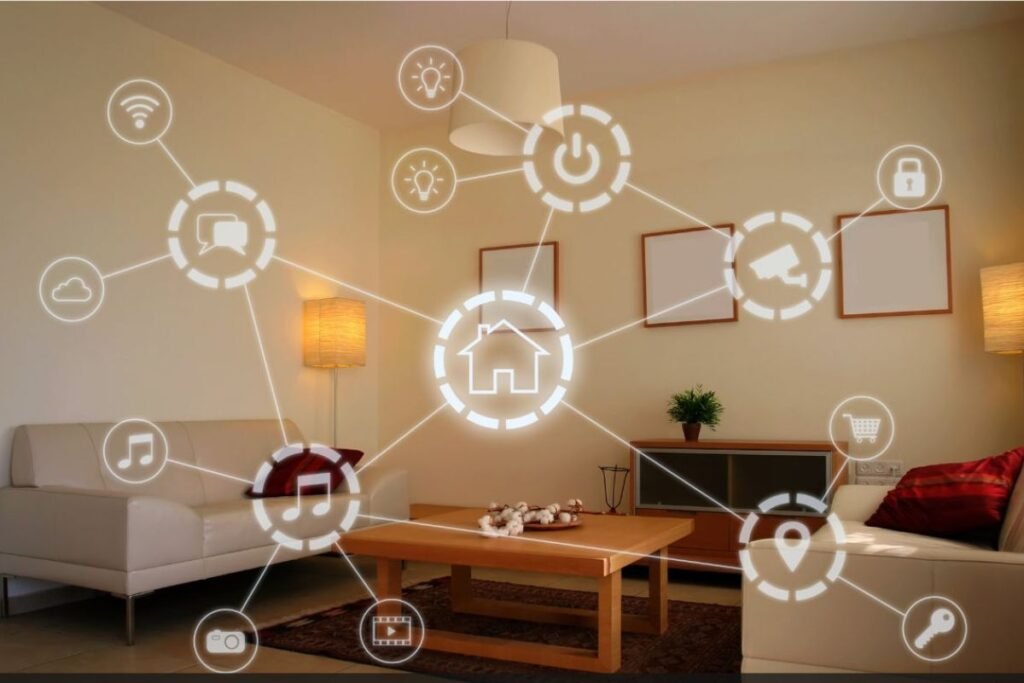
Zigbee uses a mesh networking system.
In a mesh network:
- Each powered Zigbee device acts as a signal repeater.
- Devices communicate with neighboring devices.
- The network automatically finds the best communication path.
This design increases reliability and extends coverage throughout the home.
For example, if one device becomes unavailable, Zigbee can reroute signals through other connected devices. This self-healing capability makes Zigbee ideal for smart home environments. Learn more through our smart home networking guide.
Why Zigbee Is Popular for Smart Homes
Several factors contribute to Zigbee’s growing popularity.
Low Power Consumption
Many Zigbee devices operate for months or even years on a single battery.
This makes Zigbee particularly useful for:
- Motion sensors
- Temperature sensors
- Contact sensors
- Security devices
Energy efficiency remains one of Zigbee’s strongest advantages.
Reliable Connectivity
Because Zigbee devices create a mesh network, they often maintain stronger connections than individual Wi-Fi devices. The network becomes stronger as more Zigbee devices are added.
Zigbee Range and Coverage Explained
The communication range of Zigbee depends on the surrounding environment, obstacles, and the number of connected devices.
| Environment | Typical Range |
|---|---|
| Indoor (single room) | 30–60 feet |
| Indoor (through walls) | 20–40 feet |
| Open outdoor area | 100–300 feet |
Because Zigbee uses mesh networking, the practical coverage can become much larger as additional powered devices are added throughout the home. A larger network usually results in stronger and more reliable communication. Unlike Wi-Fi, Zigbee becomes stronger as additional powered devices are installed.
Every smart plug, wall switch, or smart bulb can extend the overall network, allowing signals to travel much farther throughout the home. For larger houses, strategically placing powered Zigbee devices creates excellent coverage with minimal dead zones.
Better Scalability
Large smart home systems may include dozens or even hundreds of connected devices. Zigbee networks can efficiently support large installations without overwhelming your home Wi-Fi network.
Enhanced Smart Home Automation
Zigbee devices communicate directly with each other, allowing faster automation and improved response times. Many users combine Zigbee technology with advanced home automation systems for seamless control.
Real-Life Zigbee Automation Examples
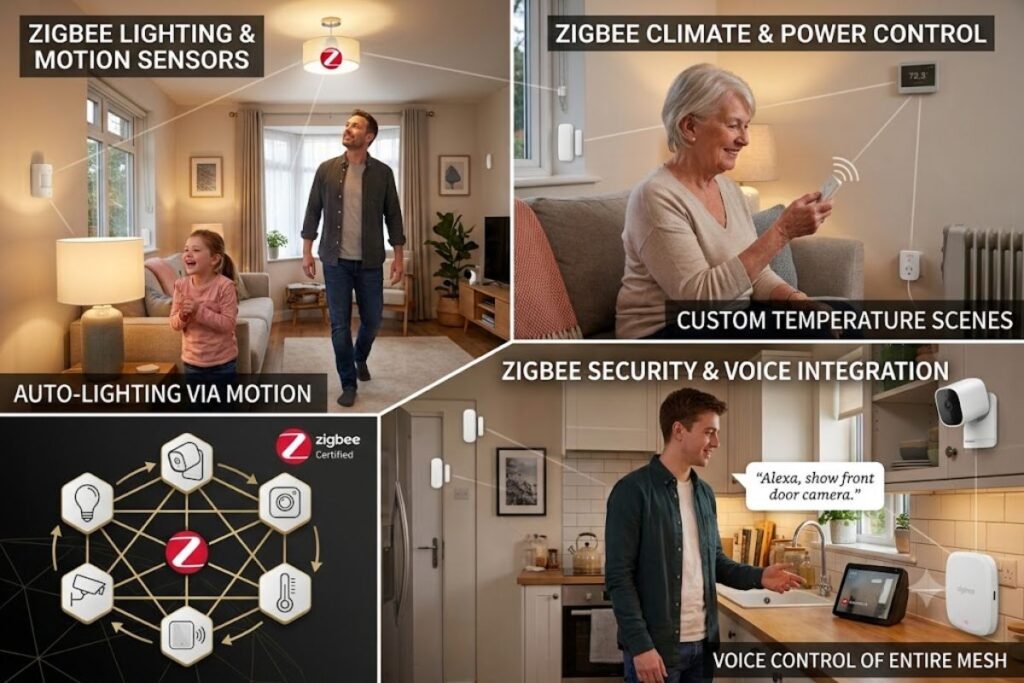
One of Zigbee’s greatest strengths is its ability to automate everyday tasks without requiring constant user interaction. Once automation routines are configured, devices communicate automatically through the mesh network.
Here are several practical automation examples:
Morning Routine
At 7:00 AM, bedroom lights gradually brighten, smart blinds open automatically, and the coffee machine turns on using a Zigbee smart plug.
Home Security
A Zigbee door sensor detects that the front door has opened while nobody is home. The hub immediately sends a smartphone notification, activates indoor cameras, and turns on outdoor lights.
Energy Saving
Motion sensors automatically switch off lights after a room remains empty for several minutes, helping reduce electricity consumption.
Night Mode
At bedtime, all downstairs lights turn off, smart locks automatically secure the doors, and security sensors become fully armed.
Vacation Mode
Random lighting schedules simulate occupancy while you’re away, improving home security and discouraging potential intruders.
These real-world automations demonstrate why Zigbee remains one of the most popular smart home technologies. While Zigbee devices strengthen your home automation, securing the smartphone you use to control them is equally important. Check out our guide on the Most Secure Phones to better protect your smart home ecosystem.
Real-World Zigbee Automation Examples
One of Zigbee’s biggest advantages is the ability to create practical automation routines that improve daily life.
Here are some common examples:
- A motion sensor turns on hallway lights automatically after sunset.
- A door sensor sends an alert when a child opens the front door.
- A smart plug turns off space heaters when everyone leaves the house.
- A temperature sensor activates a smart fan when a room becomes too warm.
- A smart lock automatically locks the front door at bedtime.
These automations happen quickly because Zigbee devices communicate directly through the mesh network instead of relying entirely on cloud services.
Benefits of Zigbee Smart Home Devices
Reduced Wi-Fi Congestion
Traditional smart devices rely heavily on Wi-Fi. As more devices connect, network performance may decrease. Zigbee operates independently from your main Wi-Fi network, reducing congestion and improving overall connectivity.
Improved Battery Life
Battery-powered Zigbee devices typically last much longer than comparable Wi-Fi devices. This reduces maintenance and replacement costs.
Strong Device Compatibility
Many manufacturers support Zigbee standards, allowing products from different brands to work together. This flexibility helps users build customized smart home ecosystems.
Increased Reliability
Mesh networking ensures stable communication even when some devices experience connectivity issues. This reliability makes Zigbee particularly valuable for security and automation applications.
For a better smart home experience, pair your Zigbee ecosystem with a high-quality smart display. Our guide to Best Display Technology explains which screen technologies offer the best clarity, efficiency, and performance for smart home control.
Pros and Cons of Zigbee Smart Home Devices
Like any smart home technology, Zigbee has both strengths and limitations. Understanding these advantages and drawbacks can help you decide whether it’s the right choice for your home automation needs.
| Pros | Cons |
|---|---|
| Low power consumption extends battery life for sensors and other battery-operated devices. | Most Zigbee devices require a compatible hub or coordinator to function properly. |
| Mesh networking improves signal strength and extends coverage as more powered devices are added. | Compatibility can vary between manufacturers, especially with older Zigbee versions. |
| Reduces congestion on your home Wi-Fi network by using a separate communication protocol. | Initial setup may be more complex than Wi-Fi devices for first-time users. |
| Supports large smart home installations with dozens or even hundreds of connected devices. | Thick concrete walls, metal objects, and electronic interference can reduce signal quality. |
| Fast device-to-device communication enables reliable automation and quick response times. | Some advanced features may only be available when using the manufacturer’s own hub. |
| Excellent battery life makes it ideal for motion sensors, door sensors, and temperature sensors. | Firmware update procedures differ depending on the device manufacturer and hub. |
| Widely supported by many leading smart home brands. | Some budget Zigbee products may have limited software support. |
| Secure communication with encryption and authentication features. | Not every Zigbee device supports the latest Zigbee 3.0 standard. |
Is Zigbee Worth It?
For homeowners planning to build a smart home with multiple connected devices, Zigbee offers an excellent balance of reliability, scalability, energy efficiency, and automation capabilities. While it typically requires a hub, the long-term benefits often outweigh the initial setup effort, especially for medium to large smart home environments.
How Zigbee Can Reduce Energy Costs
Zigbee automation can help lower household electricity usage by intelligently controlling lighting and appliances.
Examples include:
- Automatically turning off lights in empty rooms.
- Scheduling outdoor lighting.
- Controlling heating and cooling based on occupancy.
- Monitoring appliance usage with smart plugs.
- Reducing standby power consumption.
For larger homes, these automations can contribute to measurable energy savings over time while increasing convenience.
How to Choose the Right Zigbee Smart Home Devices
When buying Zigbee smart home devices, compatibility is just as important as features. Not every Zigbee product works with every hub, so checking compatibility before purchasing can save time and money.
Consider these factors before building your Zigbee ecosystem:
- Hub compatibility: Verify that the device supports your Zigbee hub or smart home platform.
- Power source: Battery-powered devices are ideal for sensors, while wired devices often strengthen the mesh network.
- Automation support: Look for devices that support routines, scenes, and voice assistant integration.
- Firmware updates: Choose manufacturers that regularly provide security and performance updates.
- Local control: Some Zigbee hubs allow devices to operate even when the internet is unavailable.
Starting with compatible devices makes future expansion much easier and creates a more reliable smart home network.
Many of the brands developing Zigbee-compatible products are backed by some of the world’s leading innovators. If you’re interested in the companies shaping the future of technology, explore our guide to the Top Tech Companies in the World.
Best Types of Zigbee Smart Home Devices
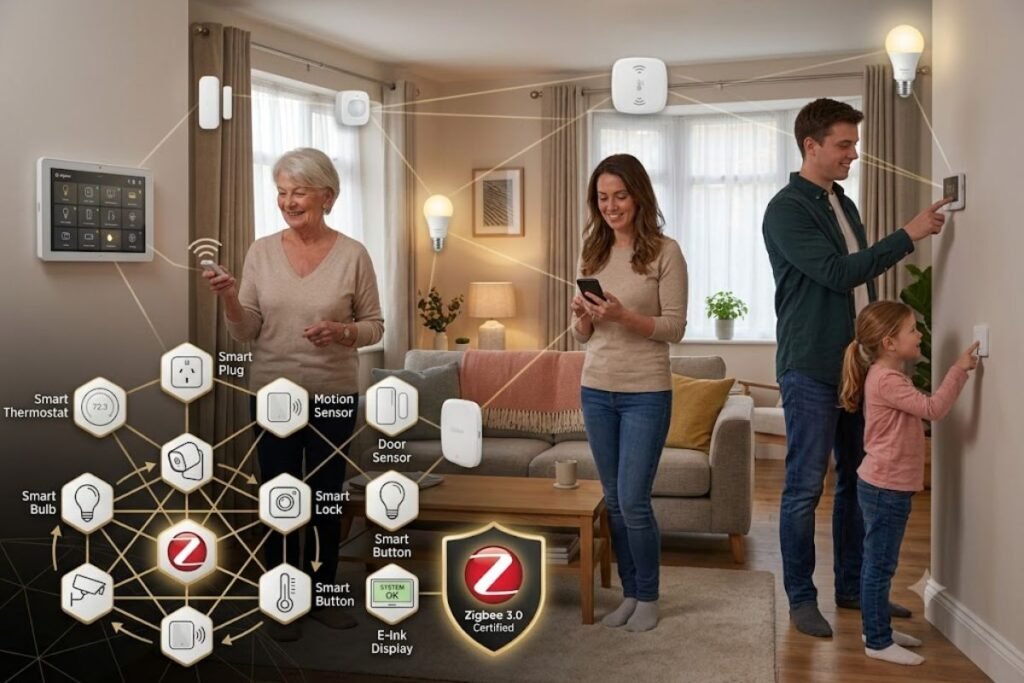
01. Zigbee Smart Lights
Smart lighting remains one of the most popular smart home categories.
Zigbee smart bulbs offer:
- Remote control
- Scheduling
- Brightness adjustment
- Energy efficiency
- Voice assistant integration
Many homeowners start their smart home journey with Zigbee lighting systems. Explore our smart lighting setup guide for more ideas.
02. Zigbee Motion Sensors
Motion sensors play a key role in home automation.
They can trigger:
- Lights
- Security cameras
- Alarms
- Smart routines
These devices help improve both convenience and security.
03. Zigbee Smart Plugs
Smart plugs transform ordinary appliances into connected devices.
Users can:
- Schedule power usage
- Monitor energy consumption
- Automate appliances
- Control devices remotely
Many households use smart plugs to reduce electricity costs.
04. Zigbee Door and Window Sensors
These sensors help monitor entry points throughout the home.
Benefits include:
- Intrusion detection
- Real-time notifications
- Security automation
- Energy-saving routines
Many users integrate these sensors into home security system configurations.
05. Zigbee Smart Locks
Smart locks provide keyless access and remote management.
Features often include:
- Smartphone control
- Temporary guest access
- Activity logs
- Integration with security systems
These devices improve both convenience and security.
Zigbee vs Wi-Fi Smart Devices
Many consumers wonder whether Zigbee or Wi-Fi is the better option.
Zigbee Advantages
- Lower power consumption
- Mesh networking
- Better scalability
- Less Wi-Fi congestion
- Improved battery life
Wi-Fi Advantages
- Direct internet connectivity
- No separate hub required in many cases
- Higher bandwidth
For large smart home environments, Zigbee often provides a more reliable and efficient solution. You can compare both technologies in our smart home connectivity comparison guide.
Zigbee vs Z-Wave
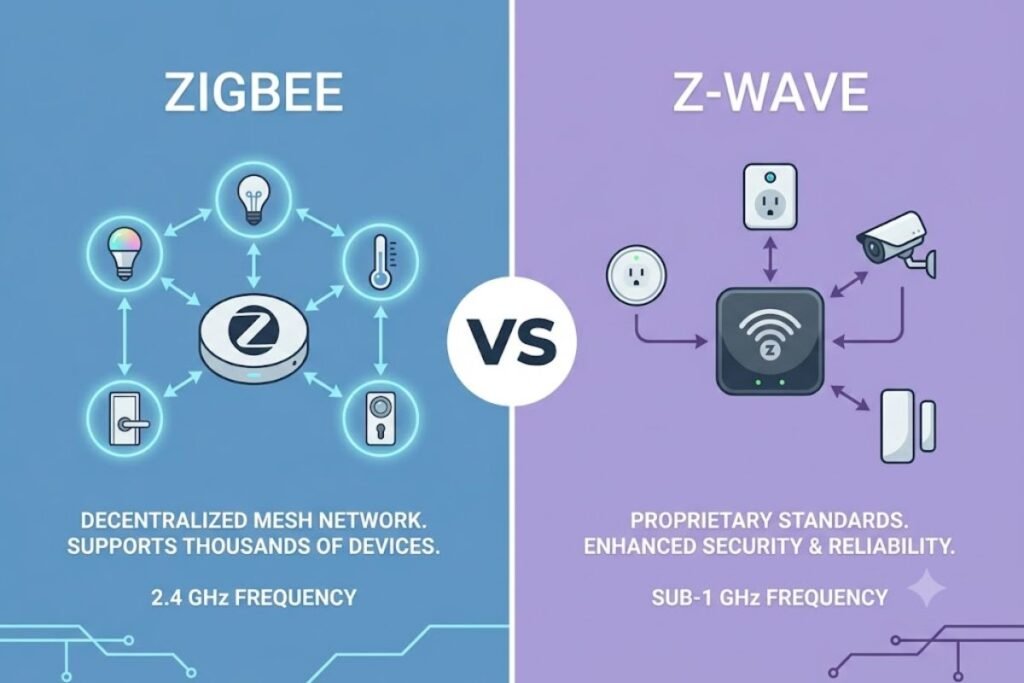
Z-Wave and Zigbee are among the most popular smart home communication standards.
Zigbee Strengths
- Supports more devices
- Faster communication speeds
- Widely adopted by manufacturers
- Lower device costs
Z-Wave Strengths
- Less wireless interference
- Strong interoperability standards
- Reliable long-range communication
Both technologies offer excellent smart home performance, but Zigbee smart home devices generally provide broader product availability.
Zigbee vs Matter: What’s the Difference?
Matter is a newer smart home standard designed to improve compatibility between devices from different manufacturers.
| Zigbee | Matter |
|---|---|
| Communication protocol | Universal smart home standard |
| Requires a Zigbee network | Works across multiple ecosystems |
| Excellent mesh networking | Focuses on interoperability |
| Large existing device ecosystem | Rapidly growing support |
Many modern smart home hubs support both Zigbee and Matter, allowing homeowners to combine devices from multiple ecosystems.
Zigbee Hubs and Smart Home Controllers
Most Zigbee smart home devices require a compatible hub or controller. The hub acts as the central communication point between devices and your smartphone.
Popular options include:
- Smart home hubs
- Home automation controllers
- Voice assistant hubs
- Multi-protocol smart home platforms
Choosing the right hub is essential for a smooth smart home experience. Check our smart home hub buying guide before purchasing.
If you store smart home backups, security camera recordings, or large automation files, understanding the differences between external SSDs and HDDs can help you choose the right storage solution for performance and reliability.
Best Zigbee Hubs for 2026
Different hubs serve different smart home needs.
- Home Assistant: Best for advanced automation and local control.
- Samsung SmartThings: Best for beginners and multi-brand compatibility.
- Amazon Echo with Zigbee support: Best for Alexa users.
- Hubitat Elevation: Best for local automation without cloud dependence.
- Aqara Hub: Best for affordable sensor-based smart homes.
Choosing a hub that supports Matter and multiple smart home protocols can provide better long-term flexibility.
If you’re building a smart home office, pairing your Zigbee setup with the best keyboard and mouse can create a more comfortable and productive workspace. Learn more in our guide to the best keyboard and mouse.
Zigbee Compatibility with Popular Smart Home Platforms
Before purchasing Zigbee smart home devices, it’s important to understand how well they integrate with your preferred smart home ecosystem. While Zigbee is an open wireless standard, compatibility depends on both the hub and the device manufacturer. The table below provides a general overview of Zigbee support across popular smart home platforms.
| Platform | Zigbee Support | Voice Assistant | Local Automation | Best For |
|---|---|---|---|---|
| Amazon Alexa (Echo with Zigbee Hub) | ✅ Yes | Alexa | Partial | Beginners and Alexa users |
| Google Home (with compatible Zigbee Hub) | ✅ Via Hub | Google Assistant | Depends on Hub | Google ecosystem users |
| Apple Home (via Matter or compatible hub) | ✅ Indirect | Siri | Depends on Hub | Apple users |
| Samsung SmartThings | ✅ Full Support | Alexa & Google Assistant | Partial | Multi-brand smart homes |
| Home Assistant | ✅ Full Support | Alexa, Google, Siri | ✅ Yes | Advanced users and local automation |
| Hubitat Elevation | ✅ Full Support | Alexa & Google Assistant | ✅ Yes | Privacy-focused users |
| Aqara Home | ✅ Full Support | Alexa, Google, Siri | Partial | Sensor-based automation |
Choosing a platform that supports both Zigbee 3.0 and Matter can help future-proof your smart home and simplify the addition of new devices as the ecosystem evolves.
Common Zigbee Problems and Solutions
Even reliable Zigbee networks can occasionally experience connectivity issues.
Devices Going Offline
- Check battery levels.
- Verify the device is within mesh range.
- Restart the Zigbee hub.
Slow Automation Response
- Reduce unnecessary network traffic.
- Add additional powered Zigbee devices to strengthen the mesh.
- Update hub firmware.
Pairing Problems
- Reset the device before pairing.
- Move it closer to the hub during setup.
- Remove old network entries if necessary.
Weak Signal
- Place Zigbee routers (smart plugs or switches) between distant devices.
- Avoid interference from metal objects and electronic equipment.
Regular maintenance and firmware updates usually resolve most Zigbee network issues.
Security of Zigbee Networks
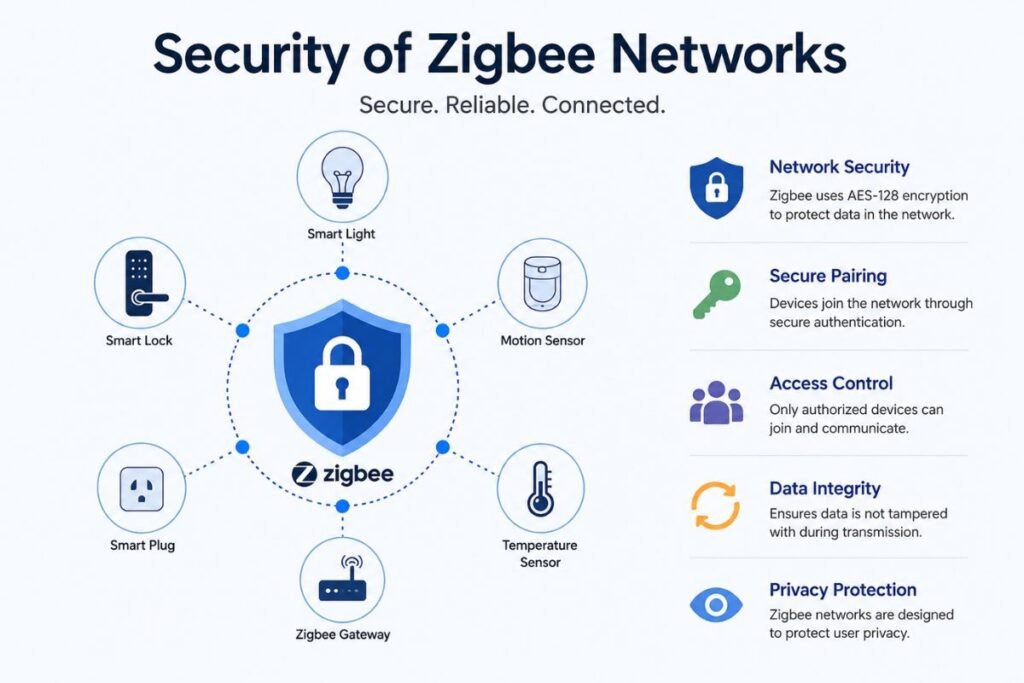
Security remains a major concern in smart home environments. Fortunately, Zigbee smart home devices include several built-in security features.
These include:
- Encryption protocols
- Authentication mechanisms
- Secure device pairing
- Network protection features
Users should also follow IoT security best practices to strengthen overall protection.
Security Tips
- Update firmware regularly.
- Use trusted manufacturers.
- Remove unused devices.
- Secure your home network.
- Enable available security features.
Future of Zigbee Smart Home Technology
The future of Zigbee looks promising as smart homes continue to expand.
Emerging trends include:
- AI-powered automation
- Energy management systems
- Smart building integration
- Enhanced interoperability
- Matter-compatible ecosystems
As industry standards evolve, Zigbee continues to remain a foundational technology for connected homes. Many experts expect Zigbee devices to play a significant role in the growth of the Internet of Things. Learn more about upcoming innovations through our future smart home technology guide.
As smart home technology evolves, many homeowners are also embracing live stream shopping to compare smart devices in real time, watch product demonstrations, and make informed purchasing decisions before upgrading their connected homes.
Beginner’s Guide to Setting Up a Zigbee Smart Home
Building your first Zigbee smart home is easier than many people think.
Follow these simple steps:
Step 1
Choose a reliable Zigbee hub.
Step 2
Install two or three powered Zigbee devices such as smart bulbs or smart plugs.
Step 3
Add motion sensors and door sensors.
Step 4
Create simple automation routines.
Step 5
Expand your network gradually as your needs grow.
Step 6
Keep all firmware updated.
Step 7
Test every automation regularly to ensure reliable performance.
Starting with a strong foundation makes future expansion much easier.
Zigbee Buying Checklist
Before purchasing any Zigbee smart home devices, make sure it meets the following requirements:
✔ Compatible with your Zigbee hub
✔ Supports firmware updates
✔ Works with your preferred voice assistant
✔ Offers reliable customer support
✔ Uses Zigbee 3.0 or newer
✔ Supports local automation when possible
✔ Comes from a trusted manufacturer
✔ Includes a clear warranty
Using this checklist helps you avoid compatibility issues and ensures your smart home remains reliable as it grows.
Expert Recommendations
If you’re building a smart home from scratch, start with a few essential Zigbee devices instead of purchasing everything at once.
A practical starter setup includes:
- One Zigbee hub
- Four smart bulbs
- Two smart plugs
- Two motion sensors
- Two door/window sensors
- One smart lock
This combination provides excellent coverage, strengthens the mesh network, and supports a wide range of automation scenarios. As your needs evolve, you can gradually add thermostats, security cameras, environmental sensors, and other compatible Zigbee devices without replacing your existing setup.
Final Thoughts
Zigbee smart home devices offer a powerful combination of reliability, energy efficiency, scalability, and automation capabilities. Whether you’re building your first smart home setup or expanding an existing ecosystem, Zigbee technology provides a dependable foundation for connected living. From smart lights and motion sensors to smart locks and energy management solutions, Zigbee smart home devices help homeowners create smarter, safer, and more efficient environments.
As smart home technology continues to evolve, Zigbee remains one of the most trusted standards for modern home automation. By choosing compatible devices, investing in a quality hub, and following security best practices, you can build a future-ready smart home that delivers convenience, comfort, and long-term value.
FAQs
Q: What are Zigbee smart home devices?
Ans: Zigbee smart home devices are connected products that use the Zigbee wireless communication protocol to automate and control various functions within a home.
Q: Do Zigbee devices need Wi-Fi?
Ans: No. Zigbee smart home devices communicate through a Zigbee mesh network. However, internet access may be required for remote control and cloud-based features.
Q: Is Zigbee better than Wi-Fi for smart homes?
Ans: For large smart home systems, Zigbee often provides better scalability, lower power consumption, and more reliable device communication.
Q: Do I need a Zigbee hub?
Ans: Most Zigbee smart home devices require a compatible hub or controller to manage communication and automation.
Q: Are Zigbee devices secure?
Ans: Yes. Zigbee supports encryption and secure communication protocols, making it a reliable option when properly configured.
Helpful Resources
If your readers are interested in technology, digital tools, or online business, they can explore Tech All World and Techh AtoZ for tutorials, software guides, and technology news.
Businesses in the food industry can discover restaurant-related insights on Restaurent.net, while travelers looking for coastal destinations can find useful travel guides on Beach Near.



3 Comments