 -by
-by If you play PC games or use graphics-intensive software on Windows, you have probably heard about DirectX. But what exactly is it, and why is it so important? DirectX is a collection of application programming interfaces (APIs) developed by Microsoft.
It helps software communicate with your computer’s hardware, including the graphics card, sound card, keyboard, mouse, and other devices. Without DirectX, many modern games and multimedia applications would not perform efficiently.
Whether you’re a gamer, content creator, or beginner exploring Windows, understanding DirectX can help you improve your PC experience.
What Is DirectX?
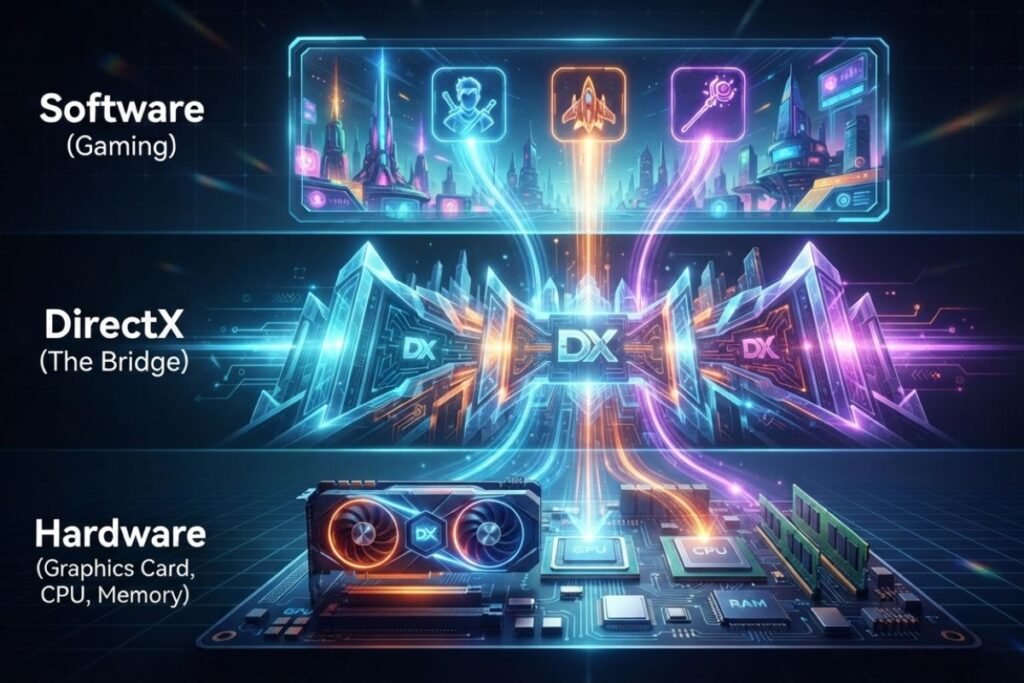
DirectX is a Microsoft technology designed to improve the performance of games and multimedia applications on Windows. Instead of developers writing separate code for every graphics card or sound device, DirectX provides a standard way for software to communicate with hardware.
In simple terms:
- Game → DirectX → Graphics Card
- Music → DirectX → Sound Card
- Input Devices → DirectX → Game
This makes games faster, smoother, and compatible with millions of Windows computers.
Why Is DirectX Important?
DirectX plays a critical role in modern gaming.
Its main benefits include:
- Faster graphics rendering
- Better gaming performance
- High-quality visual effects
- Improved audio quality
- Hardware compatibility
- Stable gameplay
- Support for modern GPUs
Without DirectX, many Windows games would either perform poorly or fail to launch.
Want to learn more before making your purchase? Visit Our Blog Best Gaming Laptops Guide for comprehensive tech reviews, comparisons, and helpful tutorials.
How Does DirectX Work?
Think of DirectX as a translator. When a game wants to display an explosion, shadows, or character movement, it doesn’t directly communicate with your graphics card.
Instead:
- The game sends commands.
- DirectX processes those commands.
- The graphics driver understands them.
- The GPU renders the final image.
This process happens thousands of times every second.
Main Components of DirectX
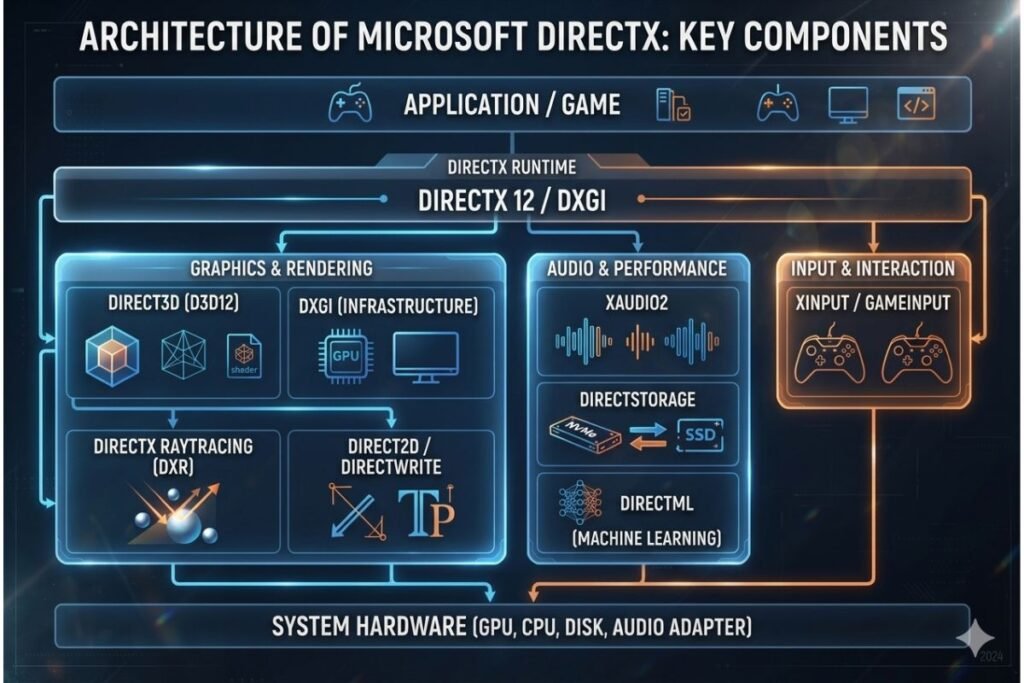
DirectX contains several technologies.
Direct3D
Direct3D is the most important component.
It handles:
- 3D graphics
- Lighting
- Shadows
- Reflections
- Ray tracing
- Animations
Most modern games rely heavily on Direct3D.
DirectSound
DirectSound processes:
- Game audio
- Background music
- Voice chat
- Sound effects
Although Windows now uses newer audio technologies, DirectSound played a major role in classic games.
DirectInput
DirectInput allows games to receive input from:
- Keyboard
- Mouse
- Joystick
- Steering wheel
- Game controller
DirectCompute
DirectCompute lets developers use the graphics card for complex calculations.
It helps with:
- Artificial intelligence
- Image processing
- Video editing
- Scientific computing
DirectX Graphics Infrastructure (DXGI)
DXGI manages communication between Windows and graphics hardware.
It improves:
- Display management
- Multiple monitors
- Graphics performance
DirectX Versions Explained
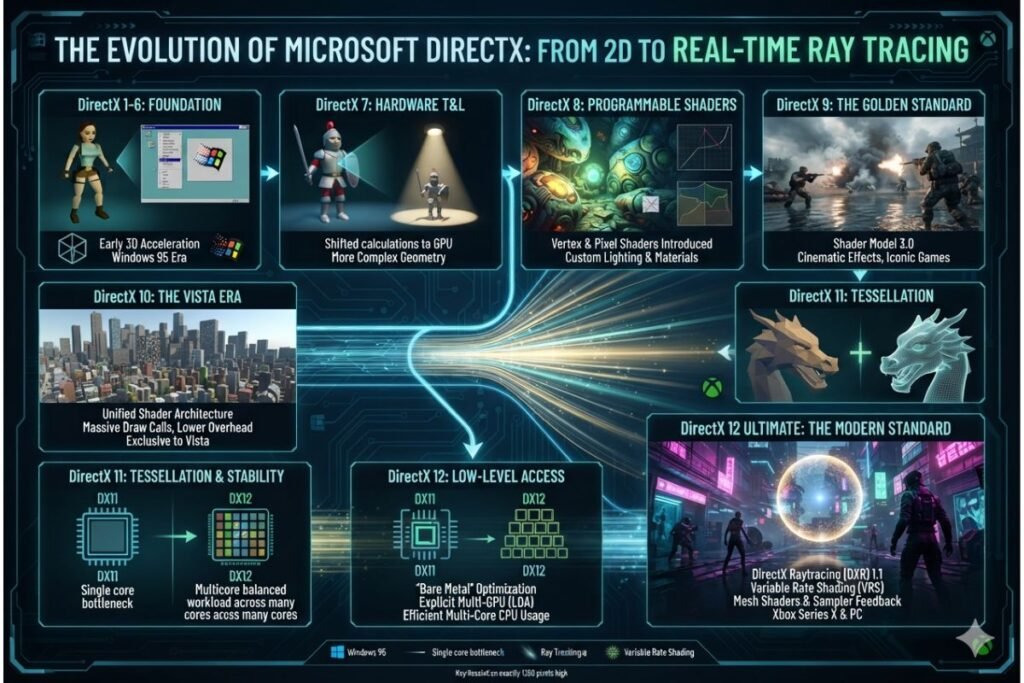
Microsoft has released several versions over the years.
DirectX 9
Released in 2002.
Features:
- Pixel shaders
- Better graphics
- Improved game compatibility
Many older games still require DirectX 9.
DirectX 10
Introduced with Windows Vista.
Improvements included:
- Better lighting
- Geometry shaders
- Improved rendering
DirectX 11
One of the most popular versions.
Benefits include:
- Tessellation
- Multi-threading
- Better performance
- Enhanced graphics
Thousands of games still support DirectX 11.
DirectX 12
The latest major version for Windows gaming.
Advantages include:
- Lower CPU usage
- Higher FPS
- Ray tracing
- Variable Rate Shading
- Mesh Shaders
- DirectStorage support
- Better GPU utilization
DirectX 12 is widely used in modern AAA games.
DirectX 11 vs DirectX 12
| Feature | DirectX 11 | DirectX 12 |
| Performance | Good | Better |
| CPU Usage | Higher | Lower |
| Multi-core Support | Limited | Excellent |
| Ray Tracing | No | Yes |
| Gaming Performance | Good | Excellent |
| Modern Features | Limited | Advanced |
DirectX 12 generally delivers better performance on newer hardware.
How to Check Your DirectX Version
Checking your version is easy.
Follow these steps:
- Press Windows + R.
- Type dxdiag.
- Press Enter.
- Wait for the DirectX Diagnostic Tool.
- Check the System tab.
Your DirectX version appears near the bottom.
How to Update DirectX
DirectX updates usually come through Windows Update.
Steps:
- Open Settings.
- Go to Windows Update.
- Click Check for Updates.
- Install available updates.
- Restart your computer.
Keeping Windows updated ensures you have the latest DirectX improvements.
Common DirectX Errors
Users sometimes experience DirectX-related problems.
Examples include:
- DirectX encountered an unrecoverable error
- Missing DLL files
- Failed Direct3D initialization
- DirectX setup failed
- Game won’t launch
How to Fix DirectX Errors
Try these solutions.
Update Windows
Install the latest Windows updates.
Update Graphics Drivers
Download the newest drivers from your GPU manufacturer.
Restart Your PC
Many temporary issues disappear after restarting.
Reinstall the Game
Corrupted game files often cause DirectX errors.
Verify Game Files
Steam, Epic Games, and other launchers let you verify corrupted files.
Install Visual C++ Redistributables
Some games require Microsoft Visual C++ libraries.
Reinstall DirectX Runtime
Older games may need the DirectX End-User Runtime.
Which Games Use DirectX?
Almost every Windows game uses DirectX.
Popular examples include:
- Minecraft
- Fortnite
- PUBG
- GTA V
- Cyberpunk 2077
- Call of Duty
- EA Sports FC
- Apex Legends
- Valorant
- Forza Horizon
Does DirectX Increase FPS?
DirectX itself does not magically increase FPS.
However, newer versions allow developers to optimize games more efficiently.
This can lead to:
- Higher frame rates
- Lower CPU usage
- Better GPU performance
- Faster loading
- Improved stability
DirectX vs OpenGL
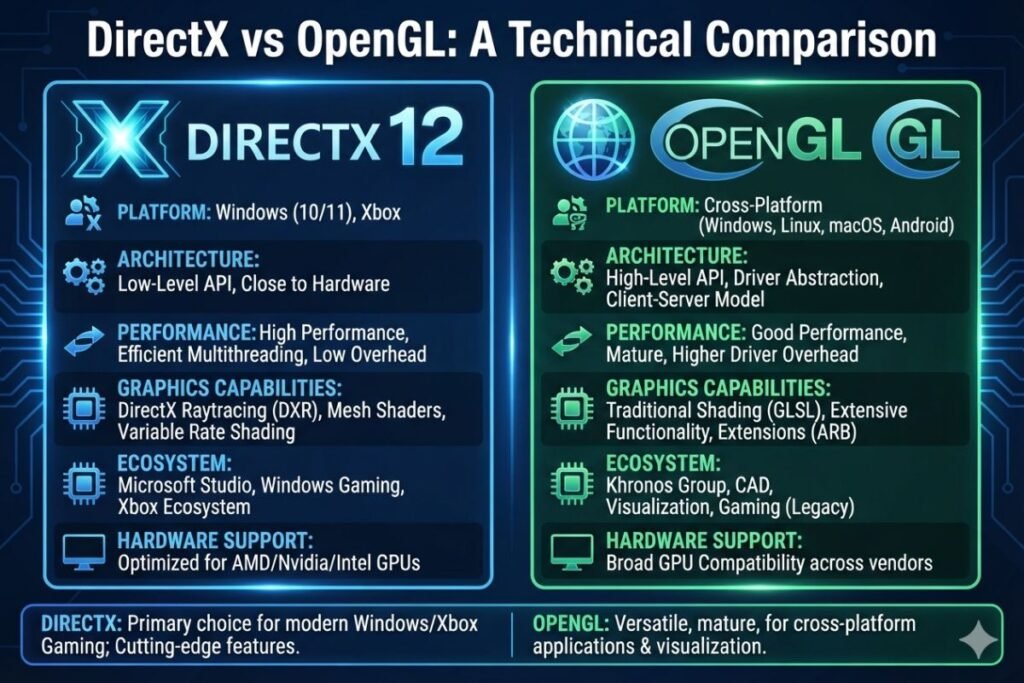
Both are graphics APIs.
DirectX
Pros:
- Excellent Windows support
- Better gaming optimization
- Advanced graphics features
Cons:
- Windows-focused
OpenGL
Pros:
- Cross-platform
- Works on Windows, Linux, and macOS
Cons:
- Slower development updates
DirectX vs Vulkan
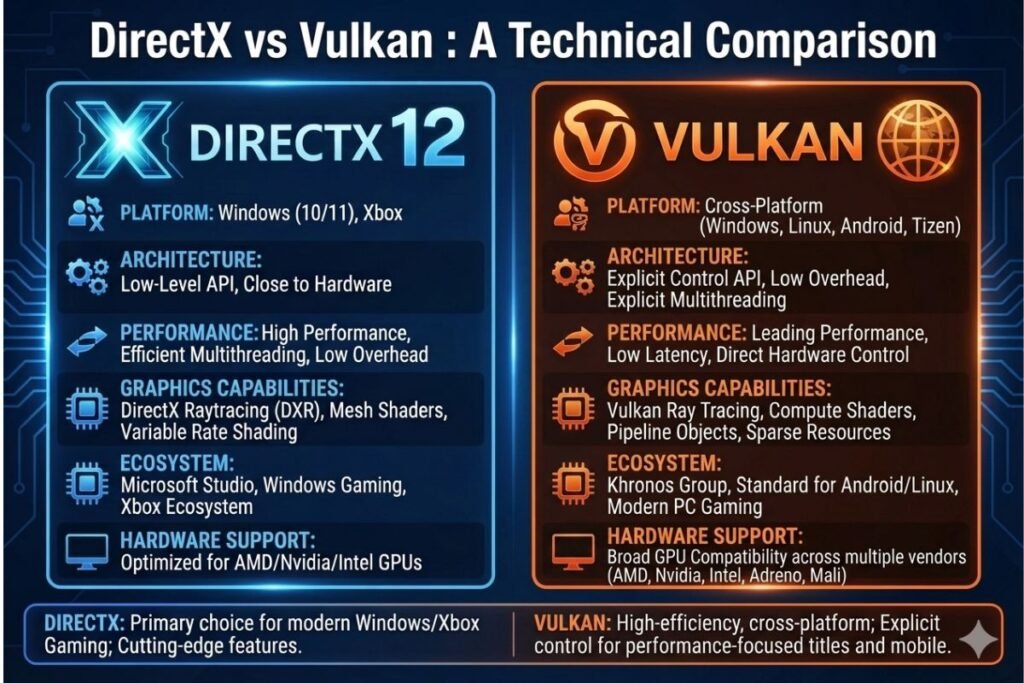
Vulkan is another modern graphics API.
DirectX
- Best for Windows
- Easier integration with Microsoft technologies
- Excellent game support
Vulkan
- Open standard
- Cross-platform
- Lower overhead
- Popular for Linux gaming
System Requirements for DirectX 12
Generally, you need:
- Windows 10 or Windows 11
- DirectX 12-compatible graphics card
- Updated GPU drivers
- Modern processor
- Sufficient RAM
Tips to Improve DirectX Gaming Performance
For the best experience:
- Keep Windows updated.
- Install the latest GPU drivers.
- Close unnecessary background apps.
- Enable Game Mode.
- Use an SSD.
- Upgrade RAM if needed.
- Monitor GPU temperatures.
- Adjust graphics settings for smoother gameplay.
FAQs
Q: Is DirectX free?
Ans: Yes. DirectX is included with Microsoft Windows.
Q: Can I install DirectX manually?
Ans: Most versions come through Windows Update. Older runtime packages are available for legacy games.
Q: Is DirectX only for games?
Ans: No. It is also used by multimedia software, video editing applications, and some professional graphics programs.
Q: Does Windows 11 include DirectX 12?
Ans: Yes. Windows 11 includes DirectX 12 support for compatible hardware.
Q: Can I uninstall DirectX?
Ans: No. It is a built-in Windows component.
Q: Which DirectX version is best?
Ans: DirectX 12 is the best choice for modern hardware and games because it offers the latest graphics technologies and performance improvements.
Conclusion
DirectX is one of the most important technologies behind modern Windows gaming. It acts as a bridge between software and hardware, making games look better, run faster, and work across a wide range of PCs. Whether you’re playing the latest AAA title or using creative software, understanding DirectX helps you troubleshoot issues, optimize performance, and get the most out of your computer.
If you’re passionate about PC gaming and technology, keep your Windows system and graphics drivers updated to enjoy the newest DirectX features and the best possible gaming experience.





1 Comment